
 日本語
 Español
 한국어
 简体中文
 Português
 Français
 Deutsch
 Italiano
 ไทย
 العربية
 Polski
 Bahasa Indonesia
 Türkçe
 हिन्दी
 বাংলা
 Русский
 Tiếng Việt
 Nederlands
 Svenska
 Dansk
 Norsk
 Čeština
 עברית
 Filipino
 Bahasa Melayu
How to export your cards for Shopify
Cardloader writes Shopify’s own product file: each card becomes a product, with its conditions as variants, pictures, a category and your price. A second file updates the stock.
What you need
- A session with identified cards.
- For pictures: an ImgBB API key in Settings › Selling › Picture hosting (free). Shopify downloads each picture from a public link.
Open Export for Shopify
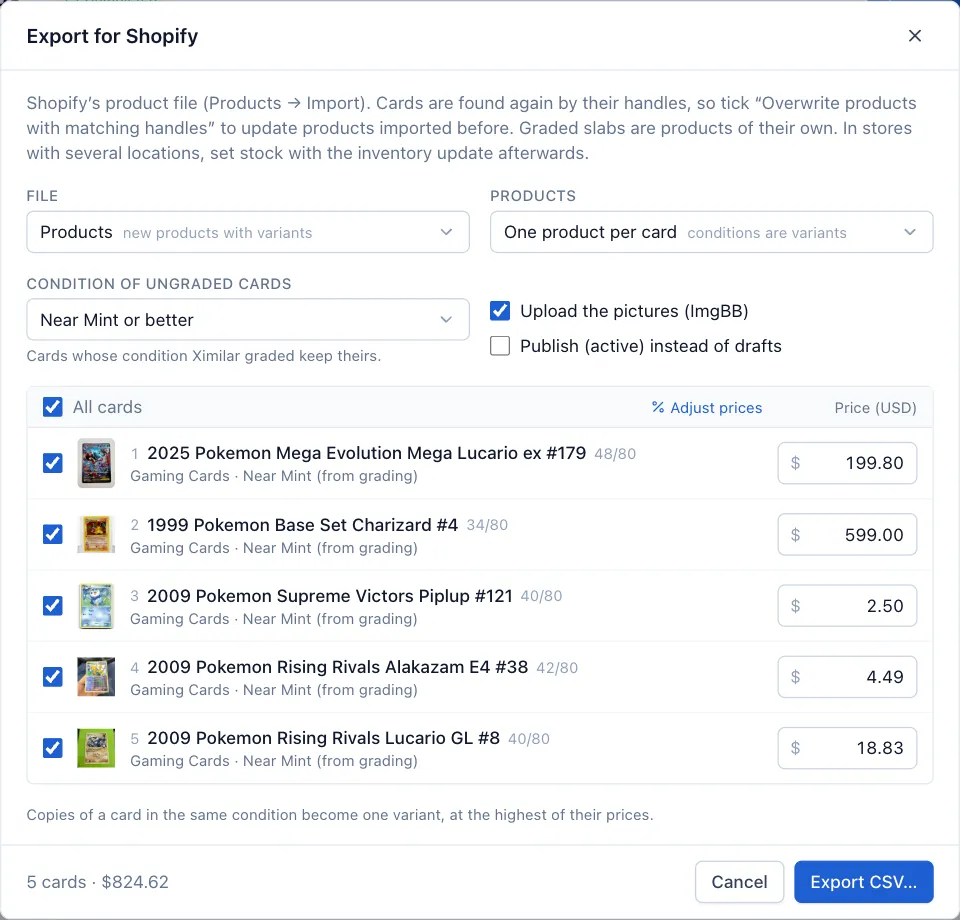
Open the session and choose Sell / Export › Export for Shopify…. Each card shows its product title, its category and its condition.
Choose the products
Under File, keep Products and choose how cards become products:
- One product per card: copies of a card share one product, and its conditions are variants. Copies in the same condition are one variant, at the highest of their prices.
- One product per scanned card: every scan its own product. Graded slabs are always products of their own.
- Publish (active) instead of drafts, Condition of ungraded cards, Upload the pictures (ImgBB) and the prices.
Import it in Shopify
Click Export CSV…. In Shopify, open Products → Import. Cards are found again by their handles, so tick Overwrite products with matching handles when you import an update.
Stores with several locations: export again with File: Inventory update and a Location, and import it under Products → Inventory → Import to set each product’s stock there.
Related tutorials
How to export your cards for Whatnot
Make Whatnot’s bulk listing CSV from a session: auction or Buy it Now, shipping profile, condition, prices and pictures, ready to import as drafts.
How to export your cards for TCGplayer
Turn a session of trading cards into a list for TCGplayer’s Seller Portal: product line, set, name, number, condition, your price and the product link.
Configuring your own listing title templates
Decide how your cards’ listing titles read on eBay, Whatnot and Shopify: which parts, in what order, your own words, and for which cards, within 80 characters.
Start scanning your cards for free
Download Cardloader for Windows, macOS or Linux, point it at a folder or your scanner, and identify your first batch in minutes. No subscription and no account needed.