
 日本語
 Español
 한국어
 简体中文
 Português
 Français
 Deutsch
 Italiano
 ไทย
 العربية
 Polski
 Bahasa Indonesia
 Türkçe
 हिन्दी
 বাংলা
 Русский
 Tiếng Việt
 Nederlands
 Svenska
 Dansk
 Norsk
 Čeština
 עברית
 Filipino
 Bahasa Melayu
How to export your cards for TCGplayer
TCGplayer imports only files from its own Seller Portal, so Cardloader makes the list you work from there: each ungraded trading card in TCGplayer’s terms, with your price and a link to the exact product.
What you need
- A session of trading cards identified by the Ximilar API, which gives the TCGplayer product of each match.
Open Export for TCGplayer
Open the session and choose Sell / Export › Export for TCGplayer…. Each card shows its product line, set and condition. Cards TCGplayer doesn’t take are listed with why: graded cards (sold there one by one as Listings with Photos), sports cards and comics.
Set Condition of ungraded cards. A card whose condition Ximilar assessed while grading keeps that condition, in TCGplayer’s words.
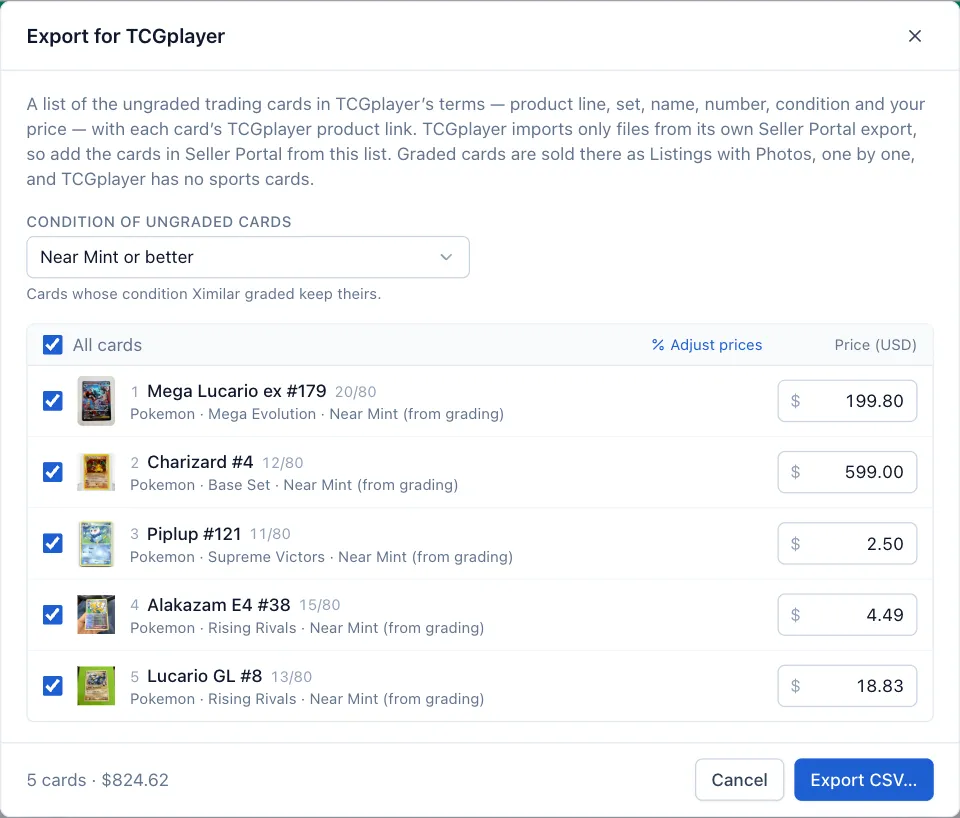
Set your prices
Each card starts at its market price; type another one where you like. Adjust prices sets the ticked cards to a percentage of the market price, optionally ending in .99 and with a lowest price, then Apply to the chosen cards.
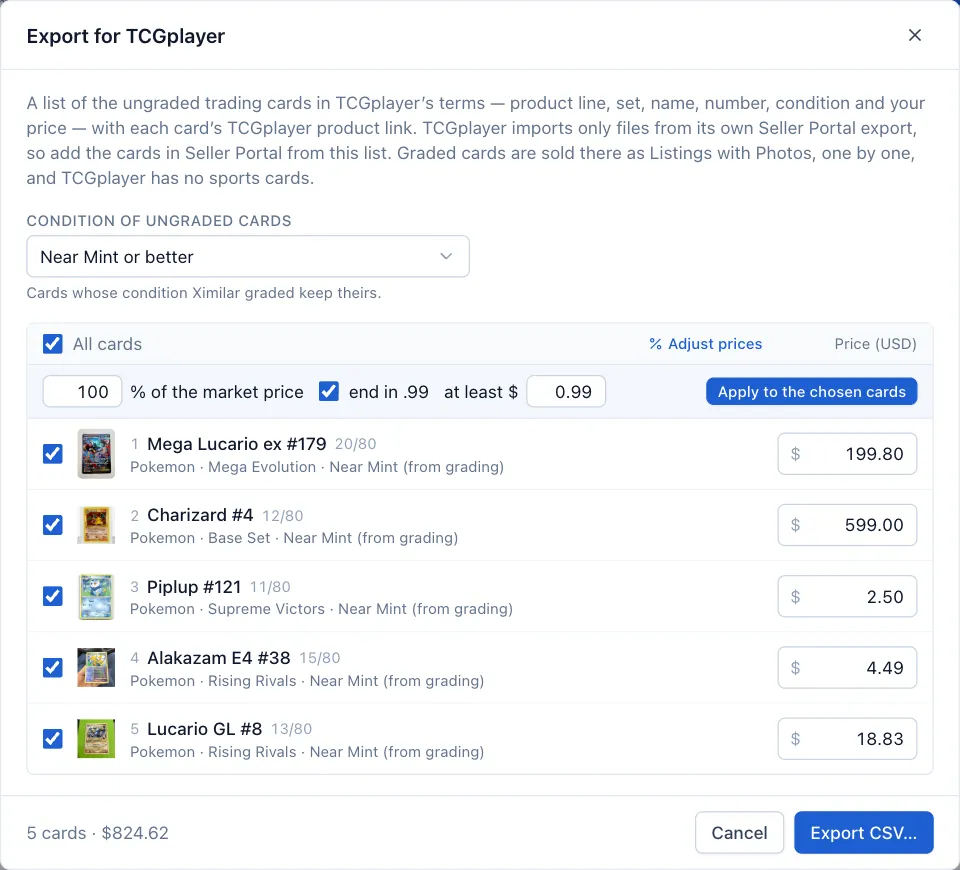
Export and use it in Seller Portal
Click Export CSV… and save the file. It lists each card once, with a link to its TCGplayer product, so you can add the cards to your inventory in Seller Portal. This session’s file:
Product Line,Set Name,Product Name,Number,Condition,Quantity,TCG Marketplace Price,TCGplayer Product Id,Product URL
Pokemon,Mega Evolution,Mega Lucario ex,179,Near Mint,1,199.80,654518,https://www.tcgplayer.com/product/654518
Pokemon,Base Set,Charizard,4,Near Mint,1,599.00,106999,https://www.tcgplayer.com/product/106999
Pokemon,Supreme Victors,Piplup,121,Near Mint,1,2.50,88151,https://www.tcgplayer.com/product/88151
Pokemon,Rising Rivals,Alakazam E4,38,Near Mint,1,4.49,83503,https://www.tcgplayer.com/product/83503
Pokemon,Rising Rivals,Lucario GL,8,Near Mint,1,18.83,86888,https://www.tcgplayer.com/product/86888
Related tutorials
How to export a custom CSV of your scanned cards
Export the cards of a Cardloader session to a CSV file: pick the columns, put them in your order and rename the headers your spreadsheet or shop expects.
Using a local model to estimate the condition of trading cards
Let a local AI model tell each trading card’s condition, such as Near Mint or Lightly Played, on TCGplayer’s, Cardmarket’s or eBay’s scale, offline and free.
How to export your cards for Shopify
Make Shopify’s product CSV from your scanned cards, with conditions as variants and pictures, and an inventory file that sets the stock of each one.
Start scanning your cards for free
Download Cardloader for Windows, macOS or Linux, point it at a folder or your scanner, and identify your first batch in minutes. No subscription and no account needed.