
 日本語
 Español
 한국어
 简体中文
 Português
 Français
 Deutsch
 Italiano
 ไทย
 العربية
 Polski
 Bahasa Indonesia
 Türkçe
 हिन्दी
 বাংলা
 Русский
 Tiếng Việt
 Nederlands
 Svenska
 Dansk
 Norsk
 Čeština
 עברית
 Filipino
 Bahasa Melayu
How to export a custom CSV of your scanned cards
Every session can be saved as a CSV file. You choose which columns go in, in what order, and what each header says; Cardloader remembers the choice for the next export.
What you need
- A session with identified cards (any engine).
Open Export CSV
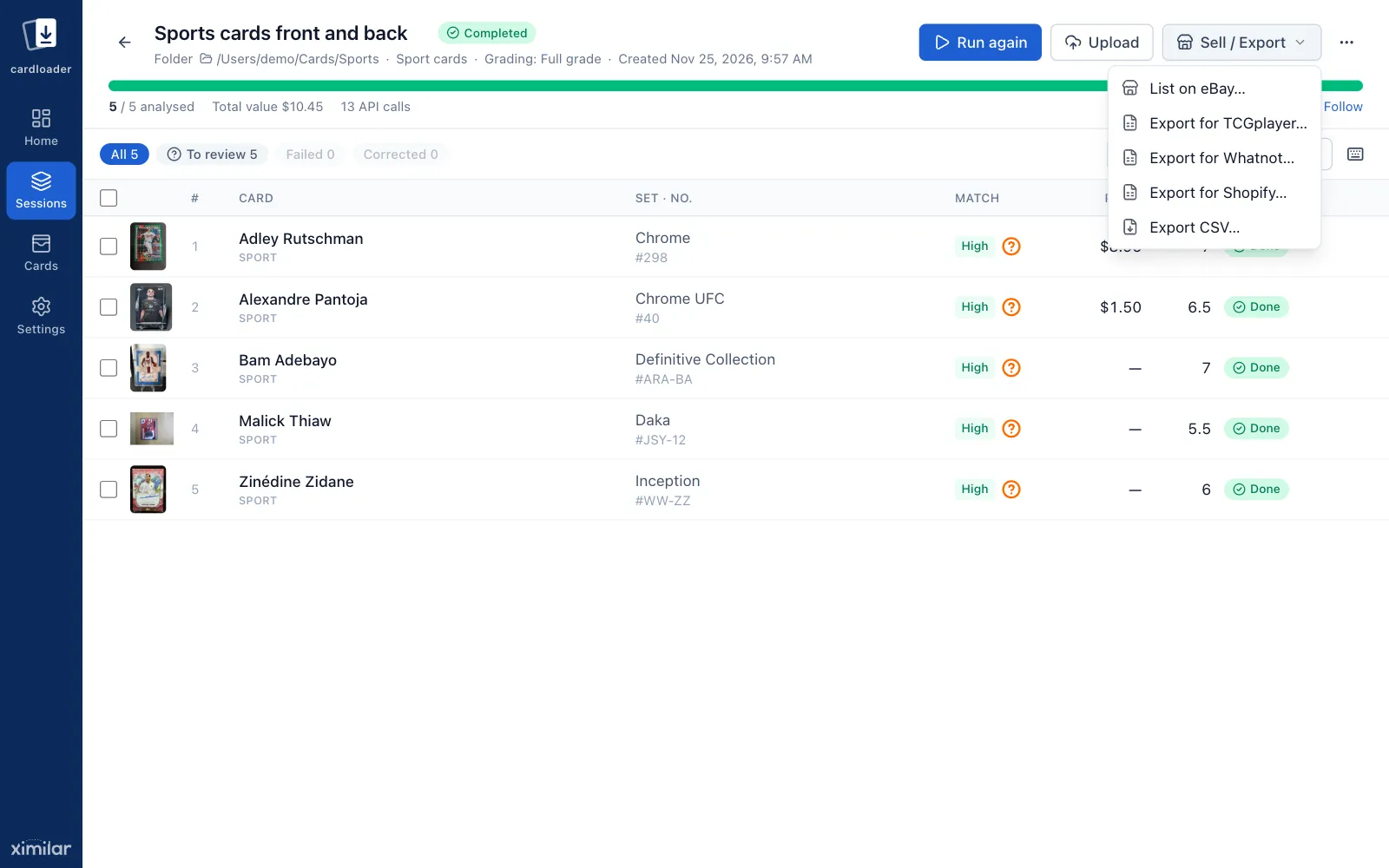
Open the session and click Sell / Export at the top, then Export CSV…. The same item is in the session’s ⋯ menu.
Choose where the file goes
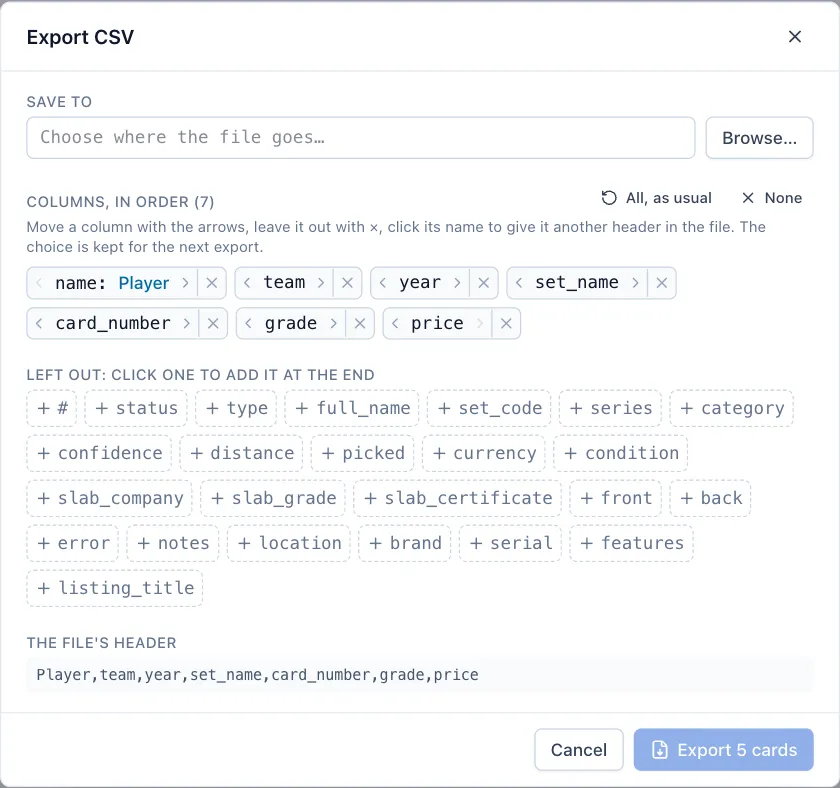
Next to Save to, choose a folder and a file name. The folder is remembered for the next export.
Pick, order and rename the columns
Under Columns, in order every column the file will have is listed. Move a column with the arrows, leave it out with ×, and click a left-out column to add it at the end.
Click a column’s name to give it another header in the file, for example Player instead of name, then click OK. All, as usual brings back every column with its own header.
The file’s header line is shown under the columns, so you can see exactly what the first row will be. Two columns with the same header are flagged before you export.
Export
Click Export N cards. Cardloader writes the file and says where it went. Open it in Excel, Numbers, Google Sheets or your inventory tool. The session above gave this file:
Player,team,year,set_name,card_number,grade,price
Adley Rutschman,Baltimore Orioles,2026,Chrome,298,7,8.95
Alexandre Pantoja,,2026,Chrome UFC,40,6.5,1.5
Bam Adebayo,Miami Heat,2025,Definitive Collection,ARA-BA,7,
Malick Thiaw,AC Milan,2025,Daka,JSY-12,5.5,
Zinédine Zidane,Real Madrid C.F.,2026,Inception,WW-ZZ,6,
A CSV with Cardloader’s own headers can be imported back with Import CSV on the Sessions page. A renamed header imports back only if Cardloader knows that name.
Related tutorials
How to import cards from a CSV file
Bring a card list from a spreadsheet into Cardloader: rows with a card name become cards at once, rows with only an image path are identified like scans.
How to export your cards for TCGplayer
Turn a session of trading cards into a list for TCGplayer’s Seller Portal: product line, set, name, number, condition, your price and the product link.
How to edit cards, one or many at once
Fix a card’s name, set, number or price, add team, serial or features, and add the same text to many cards’ titles or fields at once, with a preview.
Start scanning your cards for free
Download Cardloader for Windows, macOS or Linux, point it at a folder or your scanner, and identify your first batch in minutes. No subscription and no account needed.